Mostrando las entradas con la etiqueta Windows. Mostrar todas las entradas

sábado, abril 20, 2019

Advanced Renamer: renombrar archivos

https://www.advancedrenamer.com/

Advanced Renamer is a program for renaming multiple files and folders at once. By configuring renaming methods the names can be manipulated in various ways.
It is easy to set up a batch job using multiple methods on a large amount of files. The 14 different methods enables you to change the names, attributes, and timestamps of files in one go. The files can also be copied or moved to new locations based on information in the files.
With Advanced Renamer you can construct new file names by adding, removing, replacing, changing case, or giving the file a brand new name based on known information about the file.
Before performing the operations on the files you can verify that the output will be correct and if you perform the rename and regret it, you can undo the complete batch.

martes, agosto 28, 2018

Limpiar el disco rígido en forma automática–. Windows 10

Clean out your hard disk

If you’ve got a bloated hard disk filled with files you don’t need, you could be slowing down your PC. Cleaning it out can give you a speed boost. Windows 10 has a surprisingly useful built-in tool for doing this called Storage Sense. Go to Settings > System > Storage and at the top of the screen – in the Storage Sense section – move the toggle from Off to On. When you do this, Windows constantly monitors your PC, and deletes old junk files you no longer need; temporary files; files in the Downloads folder that haven’t been changed in a month; and old Recycle Bin files.

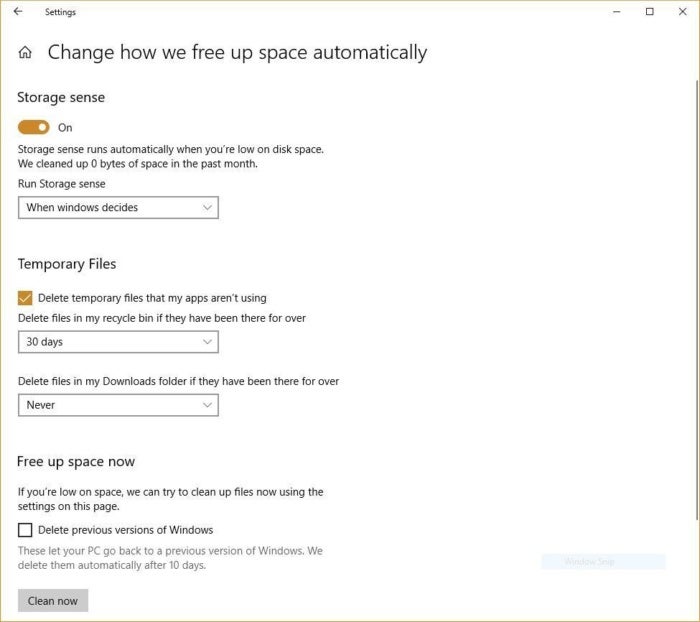
You can customize how Storage Sense works and also use it to free up even more space than it normally would. Underneath Storage Sense, click “Change how we free up space automatically.” From the screen that appears, you can change how often Storage Sense deletes files (every day, every week, every month or when Windows decides). You can also tell Storage Sense to delete files in your Download folder, depending on how long they’ve been there. And you can also set how long to wait to delete files in the Recycle Bin automatically.

storage sense Here’s how to customize the way Storage Sense works, and to tell it to delete old versions of Windows.

You can also delete old versions of Windows that might be hogging space. At the bottom of the screen, check the box next to “Delete previous versions of Windows.” Storage Sense will then delete old versions of Windows ten days after you’ve installed an upgrade. Note that if you do this, you won’t be able to revert to the older version of Windows.

viernes, octubre 04, 2013

How do I change the administrator account for a Domains.live custom domain to another Windows Live login?

You can just add another administrator account to your domain. The steps are stated below:

1. Open your web browser.

2. Go to http://domains.live.com.

3. Sign in with the Live ID you wish to make an administrator.

4. Click on Get Started.

5. Enter the domain name you wish to add to.

6. Choose whether to include hotmail service or no mail.

7. Click on I Accept.

8. You will receive a new MX record or a new CNAME record depending on which mail service you chose.

9. Set the CNAME record or Add the new MX record to activate the new administrator.

lunes, febrero 13, 2012

Como utilizar WhatsApp en Windows


WhatsApp en un PC : Manual para instalar WhatsApp en el ordenador

Cracklock–El Túnel del tiempo para aplicaciones Windows


Cracklock

Esta utilidad permite protegerse del virus más polimórfico y perjudicial del fin de siglo, el que se hace llamar "El virus del trigésimo día". Este ataca tanto a los mejores como a los peores Sharewares al introducirles, al momento de instalación un error que les impide funcionar más allá de un tiempo determinado, frecuentemente 30 días. Cracklock está a la vanguardia en la lucha contra este mortal virus que muy pocos antivirus han podido combatir.

Cracklock es además una herramienta que los desarrolladores pueden usar para verificar en sus productos el problema del año 2000, conocido por sus siglas en inglás "Y2K". Esto sin tener que cambiar la fecha de a computadora y evitándose así potenciales problemas y efectos colaterales.

Eventualmente, sería posible utilizar Cracklock, para cambiar le fecha de expiración del período de prueba de, por ejemplo, 30 días, de algún determinado software. Sin embargo, debe tenerse en cuenta, que utilizar un software, pasado el período de prueba, podría ser ilegal en algunos países.

YouWave–Emulador de Android para Windows


YouWave

Esta aplicación permite utilizar cualquier aplicación para Android, Android Market, desde Windows.

martes, enero 31, 2012

Resumen de llamadas hechas con SkyPe


Debido a mi trabajo, en muchas oportunidades debo hablar con mis clientes por SkyPe y a la vez utilizar alguna herramienta de control remoto para tomar control de sus equipos.

Las llamadas pueden ser breves o prolongadas, y a veces varias en el día, con distintos clientes.

Las horas dedicadas en estas tareas son una parte de la factura que les presento regularmente.

Hasta hora, lo que hacía era anotar lo más prolijamente posible en un cuaderno o en una planilla de cálculo. La otra alternativa, cuando no tomaba nota debido a mi falta de constancia, era revisar los logs de SkyPe, tarea que result bastante tediosa y lleva su tiempo.

Hasta que descubrí un programa que resuelve mis necesidades y que además es freeware. Se trata de SkyPeLogViewer de NirSoft. En este mismo sitio, encontrarán una gran cantidad de utilidades y programas, que seguramente le simplificarán la vida a más de un usuario de PCs.

Tiene una gran cantidad de opciones, como ser ver los mensajes de texto (chat), llamadas entrantes, llamadas salientes, etc. pudiéndose elegir cualquier combinación de ellas.

Es posible seleccionar un conjunto de líneas de la grilla en que muestra los datos y copiarlas y pegarlas en Excel para hacer las totalizaciones y/o análisis necesarios.

Muy, muy recomendable.

De Imágenes de Blogger